Disable thumbs.db in Windows 8

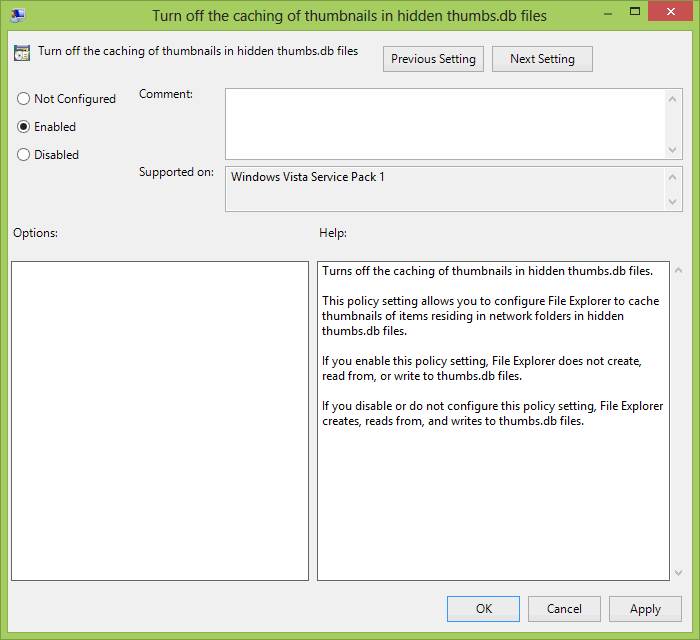
I really don’t having “thumbs.db” file in every other folder I open in Windows 8. So, I recently figured out, how to get rid of this. Below screenshot explains much of it…

grouppolicyeditor

Just open “gpedit.msc”, go to Administrative Templates => Windows Components => File Explorer. Look for entry “Turn off the caching of thumbnails in hidden thumbs.db files.”
Right click and edit this entry, click on “Enable” to Disable the generation of thumbs.db anymore…

enable

Please use the comments section, if you are still not able to achieve this…

Comments

  1. Hi there, its nice piece of writing on the topic of media print, we all understand media is a enormous source
    of data.

    ReplyDelete
  2. Does not Work for BASIC Win 8,or 8.1
    Only works for Pro (occasionally) [i.e. where mfg cersion on Win 8 has not shut down registry hacks and gpedit]

    ReplyDelete
  3. Viagra Online Comprar https://apcialisle.com/# - Buy Cialis Buy Viagra With No Prescription buy generic cialis online Viagra Y Cialis Cual Es Mejor

    ReplyDelete
  4. Clomid Provames http://apcialisle.com/# - Buy Cialis Dutasteride Us Secure Ordering Fedex Shipping Amex cialis 5mg Kamagra Rezept

    ReplyDelete
  5. Kamagra Alcobendas https://apcialisle.com/# - Cialis Levitra First Time Use online generic cialis Caniadians Cilus

    ReplyDelete

Post a Comment

Popular posts from this blog

5 things to remember before buying a new smartphone

When you need a new smartphone, it isn’t easy deciding which phone to pick and if you are not careful, you might end up paying extra for features you do not need. That is why it is advisable to compare mobile features and make an informed decision. The top runners in the list of good smartphones are the Samsung Galaxy S5, Apple iPhone 5s, Motorola Moto X, HTC One (M8), LG G2, Nokia Lumia 1520, Samsung Galaxy Note 3, Google Nexus 5 a nd Motorola Moto G. Keep in mind the design, display, performance, camera and battery while comparing these phones. Design You need to decide whether you want a small phone that fits easily in your pocket or you would rather prefer a big screen phone. The iPhone 5s is relatively small in size compared to the massive Lumia 1520. Getting a small size phone doesn’t guarantee it being lightweight, most often it is the opposite. The smaller phone, most often is the heaviest. The Nexus 5 however, is small in size and lightweight. Phones often come in plastic or ...

Fulfilling The Urge of Shopping is Now Easy

Shopaholics on the alert! Get set, and go! Yes, it has indeed turned into a race – a race of online shopping. It may be an occasion embraced shopping carnival or a clearance sale or simply just a season ending mega sale. On its way is another such colossal online shopping fest knownas the Great Online Shopping Festival or simply GOSF which is to take place from the 10th to the 12th of December 2014.   What does GOSF do? The GOSF is an initiative by Google and was launched on the 12th of December, 2012. Ever since then, it has been a favorite among its users. The GOSF offers are not only limited to those particular days of December but numerous trifle coupons, reminders as well as updates are also sent to your registered email ids all through the year. Along with these, there are funny little games on the GOSF site that provide you with innumerable opportunities to win yourself free gift coupons or free shopping facilities just by scoring points in the game.   Worried about the products...

Create Windows 7 bootable USB

Many of us are so lazy these days that we do n’t want to use optical media for any purpose. Now, even Mini laptops do n’t include DVD +RW drive in them. My friend having a similar problem came to me, he was not having any optical media drive in hp Mini laptop. So, he asked me about how could he be able to load Windows 7 or Vista into it, and the answer is by creating a bootable usb pen drive. It is very simple to create a bootable USB drive for Windows 7. Here is the whole guide to create Windows 7 USB installation Preparing the USB drive Get a 4GB or more capacity of USB pen drive, SD/MMC card might also work (not tested by me). Format the pen drive in NTFS file system and copy all the data of Windows Installation DVD into USB drive. Click on start and click Run… Type cmd and press enter. Run cmd as administartor. Now open the USB drive, for example J: drive is my USB drive, I’ll type J: and press enter. Type- cd boot bootsect /nt60 J: /force This will make your pen drive...